Articles by "Slider Main"
Showing posts with label Slider Main. Show all posts

Hey guys here we will discuss on the topic that where we can find the free background music for our website. So, the YouTube can give us these music and fulfill our requirements.
1) First of all if you have a google account than login to YouTube.
2) Why login? for saving and following the new musics...
3) Than go to your YouTube chanal and click on the music library present on the menu bar on the left side. 
For further innovation see this video.

4) go the following link to find the free music:
             https://www.youtube.com/audiolibrary/music
5) Its all about this.


As we say above. there is no need to purchase any hosting. Just create an account on DropBox. 
1) Create Account.
2) Login to your account.
3) Upload the required file. 
    NOTE: If your are uploading the .CSS files than first open the         file and remove the following tag: .  do for       other html and .JS file. For .JS files remove and
 and for html files remove and tags than you will be able to get 100% benefit and results.4) Now click on the file and click on the publish button.
5) Now click the Create link  a link will created to pointing to this       file and automatically copied to clipboard.
6) So, Now open notepad and paste the link by pressing Ctrl+S on       the keyboard. 
7)  The link will look like this:
      https://www.dropbox.com/s/[file code]/[file name with extension]?=0
8) SO copy the code and manually make the link like this link.
    https://dl.dropbox.com/s/[file code]/[file name with extension]
9) Remove the dl?=0  and the replace the www with the dl.
10) Paste this linnk where you want and enjoy.
If you like this don't forget to leave like and comment

 For further information see the video below:


BYE!
Starts with the name of ALLAH who is Lord of Grace and Ever Merciful:

Hey friends today we will took a look on the website designs that we can make free and easy. Because this post is for those who are looking for a professional and almost free website. For students and those who remains free and do nothing, it is big opportunity for him. Because the platform and method that I am telling you is easy to use and best for students because here they can use there skills, its does not they are expert or not, and for those who knows nothing can find and get knowledge after reading this post.  There is no need of any skills. its free that you never believe just a need of little more time.

So lets start with the introduction:


Introduction:


The website is on-line platform where you can sell, buy, provide and get any thing that you need so there are hundreds of categories of websites so here the first thing is to decide that for what purpose you are making website? For your business, your school, college and university and for your hotel or restaurant and for selling your products and any other entertainment program or your a retired employee or student whatever its does not matter who are you?

The best decian grab the user to your site. Its contain your domain name which is actually your site name like www.seasonsoft.org, your site title and tagline which provide the information to the users that what this site about is? so here are the platforms that offer the free website with our requirement.


www.blogger.com

www.wordpress.com


These two platforms are free and premium also.

The blogger is best option for those who little know about the JAVA, HTML, and CSS.
The WordPress is for those who know about php.

Move to the next page. 


The best option is a blogger. so some people think that the templates that are provided by blogger or for blogger do not fulfil their needs, then these people are wrong. We will provide you the templates for your on-line store and and like with your choice. I am also using blogger since 2013. you can see here 

www.ciitcluster.com

 so we start the blogger:

first of all download your latest templates at www.mywebsitethemes.com 

for your need.

we are providing the documentation of every template on our site.

See this video for farther customization.  


The common issue to 99% people is that how to  increase traffic on website. so here we will discuss that how to increase traffic on website legally. The traffic and user and the page view are much more difference. The traffic is a unique page view point of your website at a special platform. Like it that some people search your site on google.com, its a traffic, some people view your site www.google.com.pk its a traffic, some user view your site on www.bing.com its a traffic and some people search your site on facebook.com, the www.facebook.com , web.facebook.com , m.facebook.com , free.facebook.com its generate different traffic.

so there are hundreds of way to generate traffic but there are little way to create and produce the unique traffic. So here we will discuss the way to generate the traffic with the unique revenue .


Way to generate Traffic


1) Writing Perfect Contents:

Writing perfect contents is great way to produce the traffic on any type of web. The perfect contents are the contents which grab the user to your site and provide full information about the article that you are discussing on. Unique and perfect contents that user always find must be written.

Here are the some point to be noted during writing a perfect post.


* Always guide the people through exact way.


* Avoid posting those ads that redirects the pages to another site.

* Do not try to cheat with your users by posting an adult contents.

* Make the post title a related to about you want say to people.  

* Provide the exact information.

* Do not hide the information links and downloading links, because this method will bore your audience.

* Provide the references and links to prove the audience that the contents are exact and real.

* Never copy the contents from other site because its leads to the bad effect and disturb the user attention and your site status will drop in SEO and google rank  ( will see in next post).

2) Advertising on social Media


Advertising on social media is popular method to generate
traffic and grab the user’s attention and increase the number of user. This
method is almost free because in these days every man has an account on social
media. The knowledge is a power everyone know about it. So make an account on
Facebook, YouTube, WhatsApp, Google+, Thumbler, LinkedIn, and Twitter and on
other social media that you know. Facebook is much popular in these days and
growing very fast so you can make a profile and create some pages, invite your
friends and ask for like them. Create the Facebook profile and add daily new
friends, it doesn’t matter you know them or no because your purpose is to
advertise your product. Increase you friend will increase the people to come to
your site. So here is the question
How to become a popular in social media? You can read this
article here.


3) Writing Infuriating contents:


The infuriating contents are another way to increase the traffic on website. The infuriating are those contents that grab the user attention For example Hot Offers, 90% discount, download free, download all in one, direct download link, download from here without payment, the premium is free now, now there is no need for any purchase.


4) Advertising through running ads

Advertise your site by ads on the sites which are more
popular in network. This method is useful and generates too many traffic. Your
ads should be properly configured, attractive and bombard. The user will
attract more. Here is the question that how to make attractive ads. You can see this article for this. 
This method can increase your traffic like explosion but
there a little problem is in it, you have to pay some dollars for this method.
Like Facebook, it is very popular in the world you can read this article that
how to advertise through Facebook?


5) By Inviting your friends


Inviting the friends is a very easiest and cheapest way to
advertise your site to create more revenues and grab the audience. You can send
invitation by the following ways:
·         * By Sending him personal Emails
·         * By sending him request
·         * By sending him invitation
·         * Posting on friends timeline
·         * By sending them personal message
·         * By sharing the website links


Advertising through cell phones or by SMS

By sending the messages to your friends and others is a best
method. Take a sim card personally and don’t give that number to anyone.
Collect your phone numbers and send them daily new offers messages. Here are
the instructions for collecting an emails and contacts. Follow these step to
collect them.
·        * Collect by friends
·        * Invite friend to give you all its contacts and
emails
·        * Collect them on the newspaper, television,
radio, papers, panels, pan flexes, advertisement and much more on the media.


This method is very interesting and useful and a lot of fun
is in it.


success message : You can successfully boost traffic by these methods.

Download Free Books, Assignments and solution manuals

Facebook advertisement allows any person to place custom ads or content targeting a specific audience, people, companies, organisations and communities with costs increasing based on the reached and engagement the ad receives. Facebook ads can show in your target audience’s News Feed, timeline, pages and on other places or the right and left column of Facebook on desktop, as well as News Feed on mobile and top and bottom.

How to advertise on Facebook in simple steps

With these steps, you will be able to setup your objective, target an audience, set a budget, and place your ad on Facebook easily after reading them.

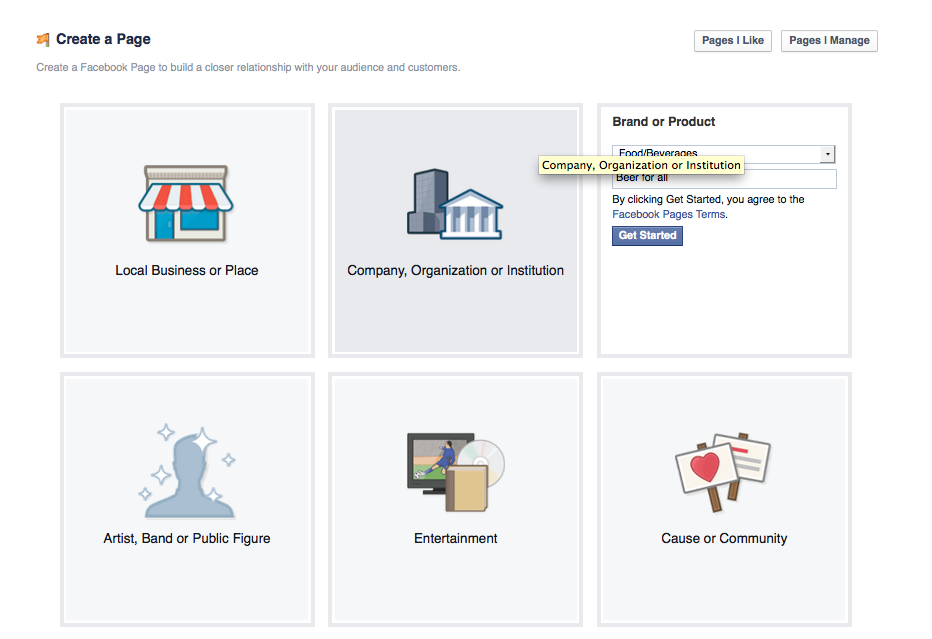
Step 1: Create a Facebook business page

Create a Facebook page first by following these steps
  1. Go to www.facebook.com/pages/create
  2. Then choose a page category
  3. Click Get Started and follow the on-screen instructions
Facebook advertising - how to advertise on Facebook
Keep these best practices in mind when creating a Facebook page
  • Fill out your page info in full detail and don't leave anything blank
  • Include a relevant Facebook profile photo as well as a creative Facebook cover photo
  • Have a Facebook page strategy
  • Use this Facebook Page Template
after creating the page you must get your Facebook page username. You can get the username here
If you show the error message like that You page is not illegible for username so pleas read this article to solve this error. Actually this error indicate that you must have minimum 25 fans to get username so after reading this article you will be able to get more than 100 fans for your Facebook page.

Step 2: Create goals for your Facebook ads

Create goal for your ads that why and for what purpose you are advertising? are you want to increase traffic on your site, increasing or want to boost your post, increasing Facebook page fans or write the purpose and set specific goal.

Step 3: Choose an objective for your campaign

Now that you have created your Facebook Page and have goals for your ads, in next step you can now go into the Facebook Ads manager and choose an objective for your ad.
Facebook advertising - how to advertise on Facebook
If your goal is to acquire registrants and get fans for an upcoming event, the Facebook ad objective you have to choose is “Raise attendance at your event.” Or if you want to grab people to your website, then you have to choose “Send people to your website.”

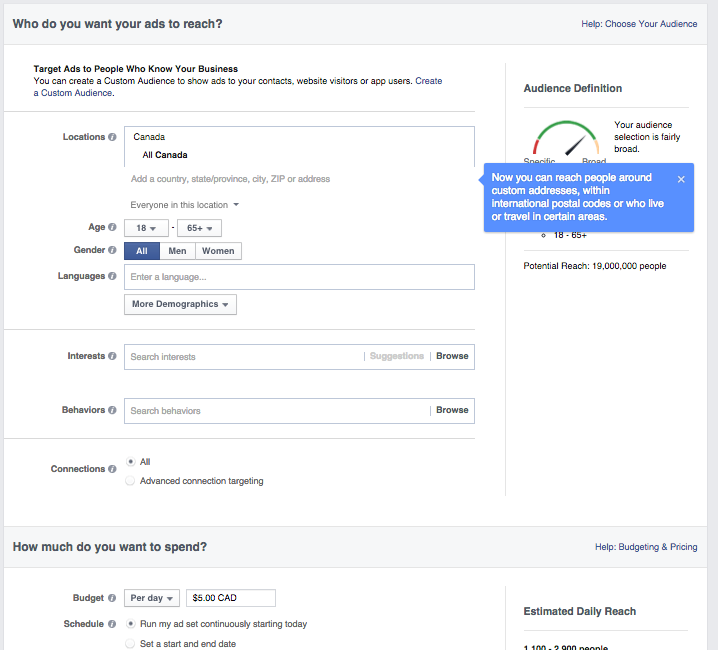
Step 4: Choose your target audience and ad spend

Facebook advertising - how to advertise on Facebook
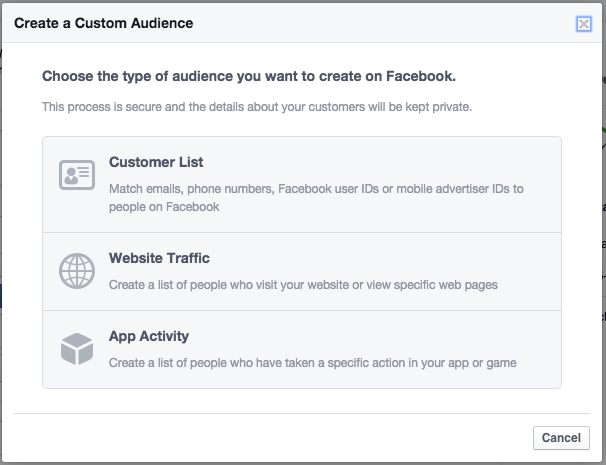
Step 5: Next see the picture to customise it further
Facebook advertising - how to advertise on Facebook
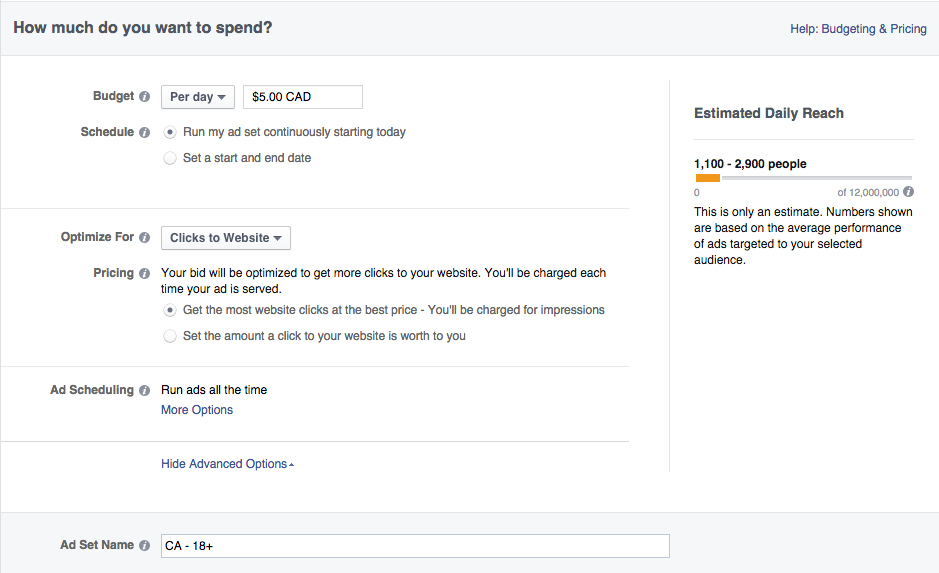
Step 6: Choose your budget:
Facebook advertising - how to advertise on Facebook
Step 7: Choose your objective:

Step 5: Choose how you want your ad to look

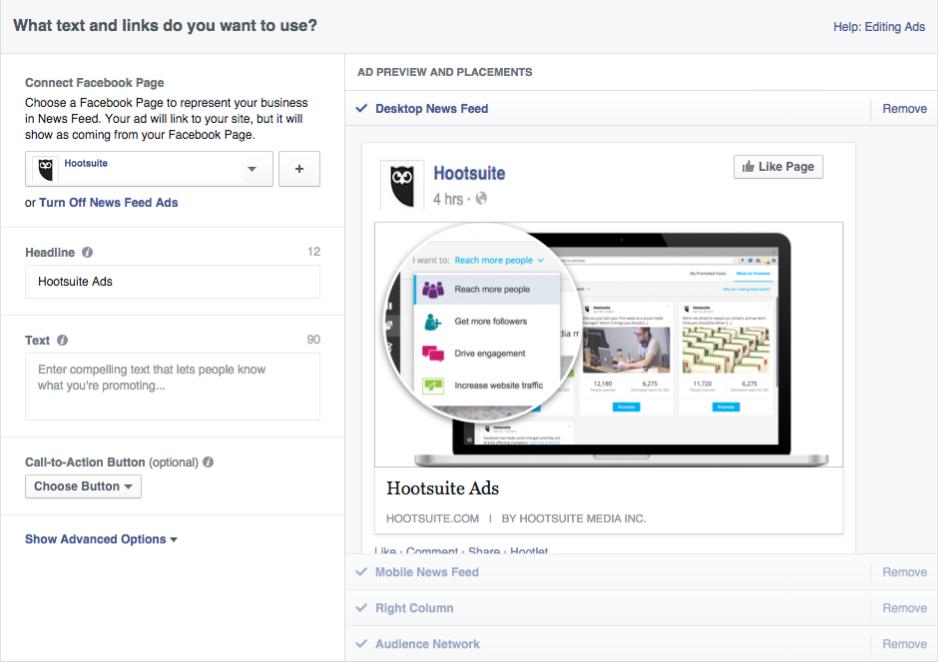
The actual creation of the ad is the fun and entertainment part of advertising on Facebook. Choose your images, gifs, videos, headlines, body texts, as well as placement of the actual ad. You can have up to 25 characters headline texts and 5 images, and .
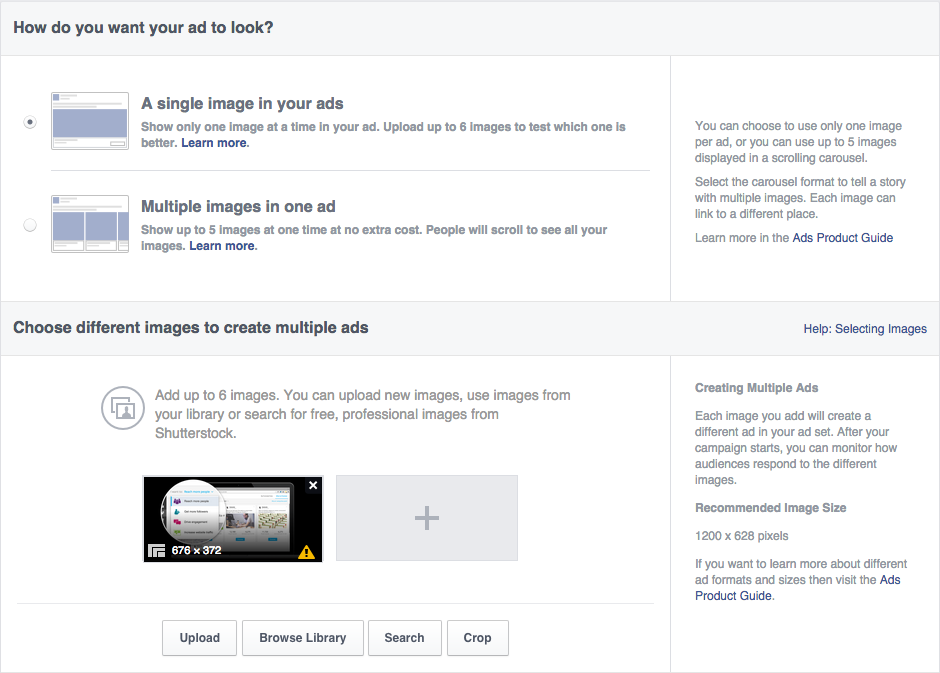
Facebook advertising - how to advertise on Facebook.
Facebook advertising - how to advertise on Facebook

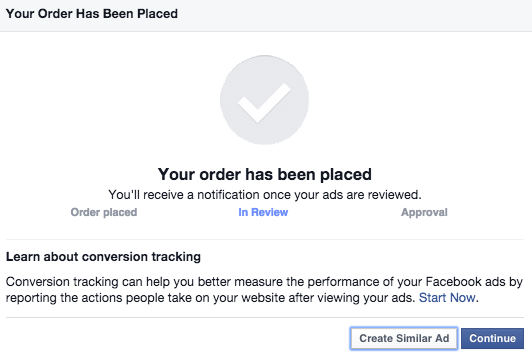
Step 6: Place your order

Once you’re ready for your ads to be reviewed and has finish all, click on the green button Place Order. You will receive an email from Facebook once your ad has been reviewed and approved. So that was all about! You'r done! Enjoy!
how to advertise on Facebook

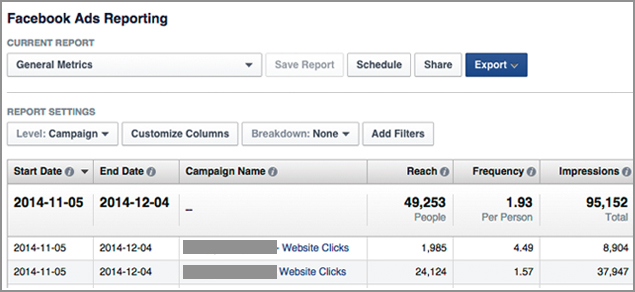
Step 7: Create a Facebook ads report

Create a report on your Facebook Ads by going to this getting started site.
Facebook advertising - how to advertise on Facebook
Thanks for Reading this article. I hope this will help you more
In these days ever one needs full freedom although on internet too.

Facebook is a very popular social media in the world. So every one has an opportunity to sign up in free. So there is question that why we can not do all just in one click, for example if a fb user has 5000 friends and invite all friends, so there is a very difficult way to invite your all friends one by one. So here is the solution of this problem. There is tool for inviting all friends in one click.

So follow the steps and so this.

1) Login to your account.

2) Open any page that you want to invite your friends for like.

3) Now open new tab and search: Invite All for chrome

4) Click on the first link and install               

    chrome extension from chrome store

5) Invite all will added to your browser.


 6) See it carefully you will see a click sign on the left corner of the screen shoot.

7) Now go back on the Facebook page and at left corner at the middle you will see a line saying: Invite your friends to like this page. 


8) Click the link and a popup will appear like this screen shoot.

9) Now click on the click sign button on the right corner of the chrome like this.


10) Click it, and new popup will appear like this and will turn and changed. See the screen shoots.

SO all is here and wait for next screen like this.


Close it and enjoy! your all done!
If you like this don't forget to like and leave a comment
See video regarding any problem!